Beginner's Guides
Messaging and Templates
OTAs
Airbnb Automated Messages: How to Take Your Guest Messaging to the Next Level
Establishing good communication with Airbnb guests via messages is crucial to ensure they enjoy their stay at your vacation rental home.

Establishing good communication with Airbnb guests via messages is crucial to ensure they have a positive experience during their stay at your vacation rental home. You should build rapport with guests while providing them with the necessary information, as this will help you earn 5-star reviews and secure repeat bookings.
Writing the same welcome message or other messages repeatedly and sending them to guests manually is very time-consuming, especially when you have many listings. But by using the Airbnb scheduled messages feature, you can automate your guest communications and run your SRT business more efficiently.
Find out how to optimize your communication with guests and ensure a personalized experience using Airbnb automated messages.
Airbnb Scheduled Messages
Available to all hosts, the Airbnb scheduled messages feature helps streamline their communication with guests. You can use it to share the routine info your guests need after booking your home.
You can create templates to send your guests the same helpful information about staying in your space, such as house rules, directions to your property, check-in and check-out instructions, etc. After that, you can schedule to send such messages automatically based on such triggers as a new reservation, check-in, or check-out, selecting the time before or after the trigger.
You can personalize your Airbnb check-out message and other scheduled messages by adding shortcodes. These are special tags that act as placeholders. They gather information from a guest's booking (such as their name and check-in date) and your listing details (such as your city, address, and house rules) to fill in the blanks.
You can also set up quick replies in the Messages tab—short message templates that contain pre-written answers to frequently asked questions. You can create them ahead of time to address topics such as availability, directions, transportation, WiFi, early check-in, and late check-out, so you don't have to write them from scratch when chatting with a guest.
The Messages tab utilizes AI to comprehend a guest's question and automatically suggest a quick reply to address it. The suggestion appears in your conversation with your guest, but only you can see it. Then, you can edit the quick reply before you send it or write a different response.
Airbnb scheduled messages is a useful feature that saves time and simplifies communication, but it has its limitations:
There are only three trigger events: a new booking, check-in, and check-out.
Although AI recognizes questions from guests on a limited number of topics, it only suggests your pre-written responses, which you need to edit and send manually.
If you list your property on Vrbo or Booking.com, you'll need additional messaging services for those channels.
So, if you want all your guest messages to be relevant, personalized, and centralized in one intuitive app, you need the flexibility of vacation rental software tools like Hospitable. With our STR super app, you can automate 90% of your guest communication on Airbnb, Vrbo, Booking.com, and your Direct booking website with the help of AI.
Airbnb Automated Messages: How Hospitable Can Help You
Airbnb Automated Messages: How Hospitable Can Help You
Hospitable removes the labor-intensive task of manually responding to your Airbnb guests and makes it easy to automate messages at every customer journey stage, from booking inquiries to checkout and beyond.
You just need to develop a list of message templates (or use ours) to cover every stage of the message flow and apply shortcodes to personalize them for each guest (there are 50+ shortcodes available). Then, you can set up message rules for each of these stages. Events that can trigger an automatic response are:
New inquiry
New pre-approval
New request to book
New reservation
New cancellation
Expired pre-approval
Inquiry/booking denied
New special offer
New payment issue
Messages that reply to an event can be sent immediately or delayed for up to 60 minutes.
You can also create scheduled message rules that plan a message—when a reservation is made, before or after your guests' check-in or checkout, or on a day of the week. You can schedule messages that include check-in instructions, access codes, follow-up messages, checkout instructions, review requests, and reminders, and re-engagement (sent after checkout).
Scheduled messages can be sent to guests who book at the last minute. If the guests book their stay within 3 days of the check-in date, they will receive a booking confirmation message with check-in instructions and house rules. The system will skip the scheduled check-in message to prevent multiple messages from being sent one after another.
Hospitable can also send messages to guests when relevant, considering specific criteria. For example, if your listing is available before or after the reservation, Hospitable can automatically upsell an extra night or late checkout.
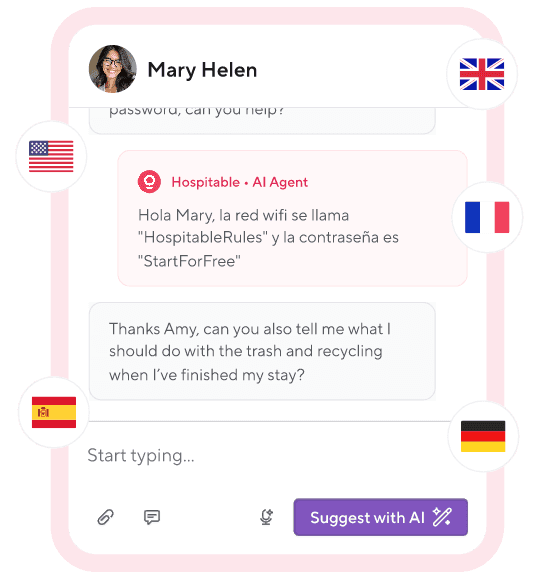
Our system uses AI to help you quickly generate a draft response to any guest message. Just open any guest conversation in your Inbox and click the 'Suggest with AI' button. Hospitable will draft a response to your guest’s last message in a few seconds based on the conversation with the guest so far, booking details, previous replies to similar guest messages in the past, and any information that you added to the Knowledge Hub.
Once a draft response is generated, you can review it and make edits if necessary before sending it to your guest. You can also select the 'Improve with AI' button to rewrite a message. Just provide some bullet points as guidance, and Hospitable will craft a personalized reply.
You can create a digital guidebook and upload it to the Knowledge Hub to educate the AI about your properties. Then our AI will produce more accurate responses based on the guidebook. You can even opt in for a fully automated AI Inbox once you trust our algorithms.
Hospitable works seamlessly with Airbnb, Vrbo, Agoda, and Booking.com listings, as well as your direct booking website, making it easy for you to communicate across all your channels. You’ll be able to manage all your messages in one centralized inbox and never miss any booking requests or questions from your guests.
As you see, Hospitable’s Guest Communication and AI functionality is more advanced than the Scheduled Messages feature on Airbnb. And Hospitable is not limited to only guest messaging. Our system can automatically send notifications to your cleaners to let them know they have a job to do, even for same-day turnover. We can also help you get more positive reviews by automating review follow-ups with your guests.
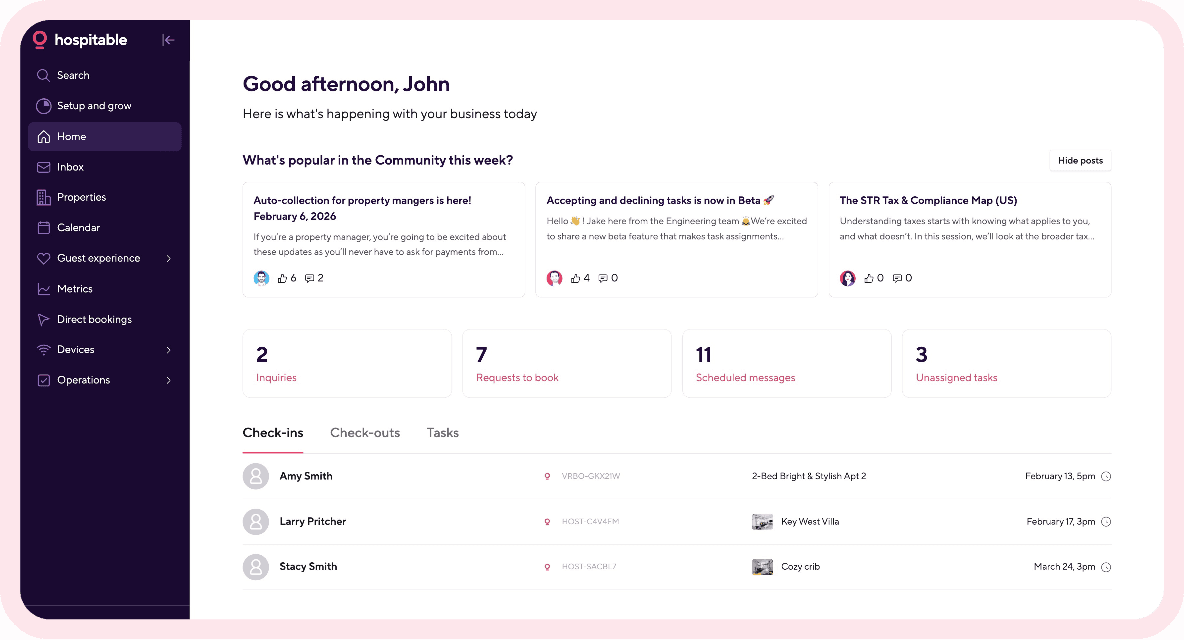
Hospitable is an all-in-one vacation rental software with comprehensive features that can help you automate 90% of repetitive tasks, saving you a lot of time. As a connectivity provider, Hospitable is an Airbnb Preferred+ Software Partner, which signifies that we have exceeded Airbnb’s technical, foundational, and performance requirements.
You can also use our direct booking website builder to drive repeat direct bookings. As a vacation rental channel manager, Hospitable can help you efficiently manage bookings across multiple channels from a single dashboard and protect against double bookings. Our tool will help you put your STR business on autopilot.
Implementing Automated Messages for Airbnb
You can set up automated messages for Airbnb using the platform’s built-in tools if you go to the Messages tab in your account and select Scheduled messages from the menu. Alternatively, you can use a property management system to leverage more advanced features and AI tools.
Choose a property management system that integrates with Airbnb, such as Hospitable, which will provide secure, reliable connectivity with your Airbnb account.
Log in to your Hospitable account, navigate to the Guest Experience section, and click on Messaging rules.
Create Event message rules (reply to an event such as a “new reservation”) and Scheduled message rules to schedule a message in advance (such as a “before check-in message”).
Create message templates or use ours and personalize them with shortcodes for each guest.
Create question rules to send quick automatic replies to common guest questions using your pre-written templates.
Use AI tools to generate draft responses to tricky guest questions.
Upload your guidebook to the Knowledge Hub to teach the AI about your property and policies and help it craft more relevant responses.
Train the AI to generate responses to guest messages, and once you feel confident, enable the AI Auto-Replies feature.
Bottom Line
The Airbnb scheduled messages feature lets you automate your booking, check-in, and checkout communications and add a personal touch with shortcodes, but it has limitations. A much better solution is to use vacation rental software like Hospitable, which offers a comprehensive system to automate all your conversations with guests and your team.
With Hospitable, you can stay on top of your guest communication with the help of AI and run your short-term rental business on autopilot. It saves you time so you can focus on providing an exceptional guest experience and marketing your property, allowing you to scale faster.



Table of contents
Common questions
What are Airbnb scheduled messages?
Airbnb scheduled messages are a native tool that allows hosts to pre-write templates and schedule them to be sent automatically at specific times. These are based on three primary "triggers": when a reservation is confirmed, at check-in, and at checkout. By using "shortcodes" (placeholders like {guest_name} or {check_in_time}), the system automatically pulls details from the booking to make the message feel personalized. This is an entry-level way to ensure guests receive basic instructions without the host having to send them manually every time.
What are the limitations of Airbnb's built-in automated messaging?
While useful for beginners, Airbnb’s native tool has several critical gaps for growing hosts: Limited Triggers—It only supports three events (booking, check-in, checkout). It cannot automate responses to inquiries, pre-approvals, or cancellations. No Multi-Channel Sync—If you list on Vrbo or Booking.com, you have to set up and manage those messages separately. Lack of Contextual Intelligence—It cannot "read" a guest's message. If a guest asks a specific question about the WiFi password inside a booking confirmation thread, the native tool will ignore it. Static Templates—It cannot handle "if-then" logic, such as sending different instructions to a last-minute booker versus someone who booked months in advance.
Can I automate responses to Airbnb guest questions?
Yes, Hospitable takes automation far beyond static templates using two sophisticated methods: Automated Question Rules: For common topics (like WiFi, parking, or pet policies), Hospitable’s AI recognizes the guest's intent. You can create "canned responses" for these specific topics, and the system will automatically send your prepared answer the moment it detects that question, 24/7. Generative AI Drafting: For unusual or complex questions that don't fit a template, Hospitable uses generative AI to draft a response for you. It analyzes your property guidebook, the specific guest’s booking details, and the history of your previous conversations to craft a natural, accurate reply that you can review and send with one click.
How do I set up a "fully automated" AI inbox?
To move to a 100% hands-off "AI Auto-Reply" workflow with Hospitable, follow these steps: Step 1. Build your Knowledge Hub. Upload your property guidebook and house rules to Hospitable. This "educates" the AI about your specific home (e.g., where the spare keys are or how the coffee machine works). Step 2. Monitor with "Suggest with AI". Start by using the "Suggest with AI" button in your inbox that creates draft responses that you can edit before sending. This allows you to "train" the AI and see if its drafted responses match your brand voice and accuracy requirements. Step 3: Enable Auto-Replies. Once you are confident in the AI's accuracy, you can toggle on "Full Guest Reply Automation." You can even set specific "Office Hours" for the AI, allowing it to handle all night-time inquiries while you sleep, ensuring you maintain a 100% response rate.