Messaging and Templates
OTAs
Vrbo Check-In Instructions: Making the Process Easier for Guests
Before your guests arrive, you need to provide them with detailed check-in instructions so that they can easily access your property and feel welcome. In this article, you’ll find some tips on creating clear check-in instructions for your Vrbo guests and what information travelers will find most useful.

When you list your vacation rental property on Vrbo, the easiest way to get 5-star reviews is to ensure that your guests have an effortless, pleasant stay. That experience starts even before travelers arrive at your place, so you should think about little things like a welcome basket that would make them feel at home. You should also ensure your check-in process is smooth and stress-free.
Before your guests arrive, you need to provide detailed check-in instructions so they can easily access your property and feel welcome. In this article, you’ll find tips for creating clear check-in instructions for your Vrbo guests, along with the information travelers find most useful.
You may also find it helpful to read our article that offers guidance on how to provide your guests with Vrbo checkout instructions.
Vrbo Check-In Instructions: What to Include
We recommend including check-in and checkout instructions in your Vrbo welcome guide. The platform will send your guests an email with this information seven days before the check-in. When creating your check-in instructions, aim to answer as many questions as possible before travelers even ask.
Still, you should be ready for the possibility that your guests may have lots of questions, so you’ll need to provide quick answers. Luckily, you can easily do it with Hospitable. Our STR super app uses Artificial Intelligence and can automate up to 90% of your guest communication.
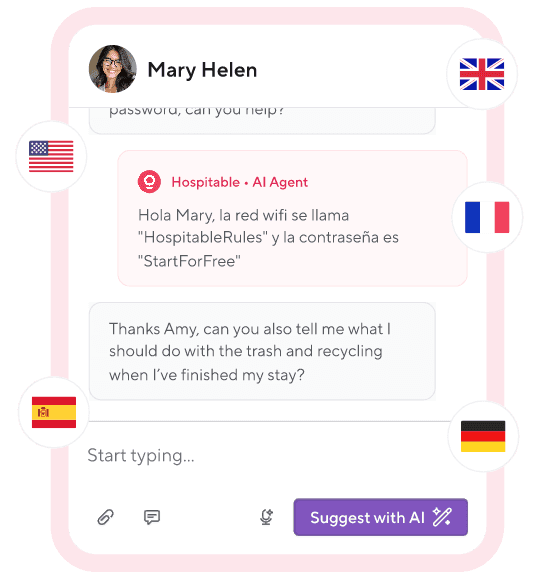
You can use Inbox AI tools to quickly create personalized responses to unusual guest questions.
Type your message and use Improve with AI to correct grammar and polish what you have drafted for clarity and tone.
Use Suggest with AI to generate a detailed draft response to the last guest message based on the property and booking details, past replies, and the relevant information you’ve uploaded to the Knowledge Hub.
Opt into a fully automated AI Inbox. Enable Auto Reply by specifying times when the AI can automatically reply to guests.
You may use this checklist for guidance on what information to include in your Vrbo check-in instructions:
Your property’s address—put it at the very top of the page.
Driving directions—explain the best way to arrive at your place from the airport, train station, or motorway.
Your check-in time.
Parking instructions and suggestions.
Contact number to reach you.
Your local contact person who can help if something goes wrong with the check-in process.
Where to find the key (Is there a lockbox code, or will you meet them upon arrival? If you have a smart lock, include a unique access code for each stay.
Ensure your guests are aware of your house rules.
You may also want to include additional helpful information, for example, the WiFi password or the list of what is provided (linen, towels, etc.), and explain where these items are located.
Vrbo Check-In Time
There is no set standard Vrbo check-in time, and each host can decide a time that works best for them and their guests. You need to include this information in your listing description. Typically, check-in time is from 2 pm to 4 pm. But people travel around the clock, so your check-in time must be, first and foremost, reasonable and flexible.
When setting the check-in time for your rental property, consider several factors. For example, many hosts use different check-in times for weekday and weekend stays. Business travelers don’t mind checking in later because they often arrive after work hours. And weekend guests seeking relaxation are more eager to arrive early, so you may offer them an optional early check-in.
You should also consider your turnaround time and coordinate your check-in and checkout times to ensure enough time to clean your space and prepare for the next booking.
Vrbo Self-Check-In
Add self-check-in to your Vrbo listing because it’s an easy way for your guests to get inside. It allows them to access the rental property without the host being present. Offering your guests self-check-in will improve their experience by allowing flexible arrival times and greater privacy. It can help make the process smoother and more comfortable for them.
Travelers can arrive at your place at any time after a specified check-in time on their arrival date and conveniently access your home using a key lockbox, a smart lock, or a keypad. Self-check-in saves you time and makes your Vrbo listing more appealing to tech-savvy travelers, increasing the likelihood they'll make a reservation.
Providing self-check-in can simplify things for guests, but as a host, you are responsible for creating a safe process. So if you use a lockbox, you should update the combination between stays and ensure that no one else has access to the keys during the reservation. After every reservation, you should also change the code if you use a keypad or a smart lock.
Hospitable has seamless integration with popular smart lock systems, including Schlage, Yale, August, and other top brands. If you connect your smart lock to your Hospitable property, our system will create a unique access code for each reservation and share it with your guest through the messaging flow at the right time. Unlike most PMSs that offer self-check-in as a paid add-on, smart device management is included in the package starting with the Professional plan.
Moreover, Hospitable offers many other valuable features to help you put your vacation rental business on autopilot. You’ll be able to take advantage of Hospitable’s built-in Dynamic Pricing feature available to users on all plans at no extra cost, manage listings on multiple platforms from one convenient location, and be protected from double-bookings.
Implementing Vrbo Check-in Instructions
On the Vrbo website, log in to your account, select Property, and add a welcome guide to your listing.
Include clear check-in instructions in your welcome guide, including directions to your property, parking info, and choose how guests will access your property from the available options. Vrbo will share the details with your guests via email three days before check-in.
You may also consider creating reservation-specific instructions in your Vrbo Inbox to provide unique access instructions for each of your guests.
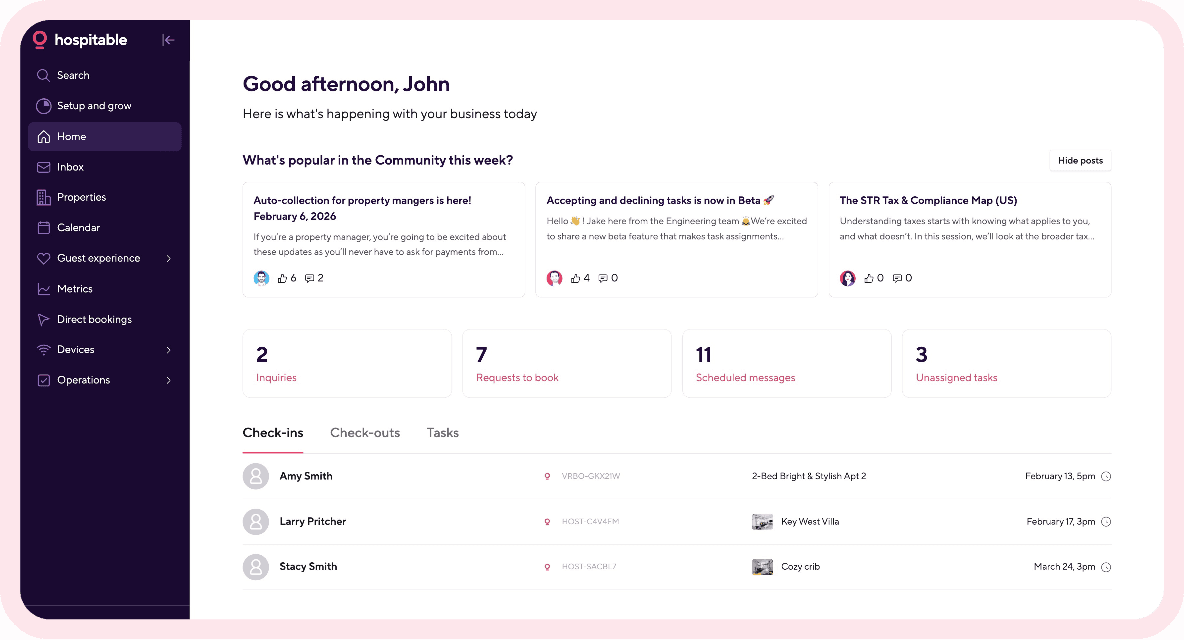
Go to your Hospitable account, then to Guest experience, and set a scheduled messaging rule to automatically send your Vrbo guests a message before their check-in with clear instructions on how to do so.
Final Thought
Clear Vrbo check-in instructions are essential to ensure a smooth check-in for your guests. They can also help you create a seamless guest experience from the very start, leading to excellent reviews and more bookings.
If you are new to Vrbo, you may also want to check out other helpful Vrbo tips for owners to help you stand out and attract more guests.