OTAs
How to Respond to an Airbnb Review
Discover tips on crafting strategic responses to guest feedback that can help improve your listing’s appeal.

Reviews are the foundation of the Airbnb community because they provide social proof and help establish trust and transparency on the platform. Guest reviews shape your reputation as a host and influence your ranking on Airbnb search and your future bookings.
Responding to guest feedback (positive and negative) is an important aspect of managing your Airbnb property, and how you respond can have a huge impact on your success on the platform. So, in this blog, we’ll discuss how to respond to Airbnb reviews effectively to improve your listing’s appeal.
Why Hosts Should Consistently Respond to Airbnb Reviews
Responding to guest feedback is more than just a polite gesture. Your response is a message to potential guests that offers real insight into who you are as a person and how you treat them. Responding to reviews allows you to highlight your commitment to exceptional hospitality and show that you’re an attentive host.
By investing time and effort in crafting thoughtful responses to Airbnb reviews, whether positive, negative, or neutral, you can demonstrate that you are approachable and genuinely care about the guest experience. It also shows that you are engaged and value feedback.
Responding to guest reviews is a powerful marketing and trust-building tool that can help you stand out from the competition and attract potential guests. And if you automate your hosting routine using a solid Airbnb PMS like Hospitable, you’ll have more time to ensure that your guests have a memorable stay, which can result in more 5-star reviews and ratings and more bookings.
Develop a Hospitable Tone
The way you respond matters. It can influence potential guests far more than the review itself, so understanding how to respond to Airbnb reviews is an important skill for any host. Here are a few things to keep in mind when responding to guest feedback.
Timing is key, so aim to reply within 3 days. This shows that you’re attentive and organized.
Whether you're expressing gratitude for a positive review or addressing a concern, it’s important to keep your tone polite, professional, and empathetic.
An effective response should be clear, concise, and meaningful. Always thank your guests for their feedback, address their concerns sincerely, and mention what you’ve improved.
Personalize your reply—refer to the guest by name, highlight specific details from their review, and mention something specific about their stay. This way, you’ll make your guests feel valued and show that you pay attention to their experience.
When responding to a positive review, use “we” because it shows that your guest’s awesome stay was a team effort, and don’t miss the opportunity to invite them to stay again in the future.
This is how a response to a positive Airbnb review may look:
“Thank you so much for your kind words, [Guest Name]! We’re delighted to hear that you had a great stay with us and found our apartment cozy and welcoming. It’s important to us that our guests feel comfortable and at home. We’re especially glad you loved the welcome basket! We’d love to host you again anytime.”
Follow these four steps to post a public response to a review that your guest has left for you on the Airbnb platform.
Click Profile and then Reviews
Click Reviews about you
Go to the review you’d like to respond to and click Leave public response
Write your response and click Submit.
Alternatively, you can go to Insights—here, you will find all of your reviews, where you can leave public replies.
How Hospitable can help with responding to guest reviews
Managing guest reviews on Airbnb can be time-consuming, especially if you have multiple listings and receive lots of feedback. However, Hospitable can help simplify this process, allowing you to create thoughtful, well-structured responses to Airbnb reviews efficiently, without losing your personal touch.
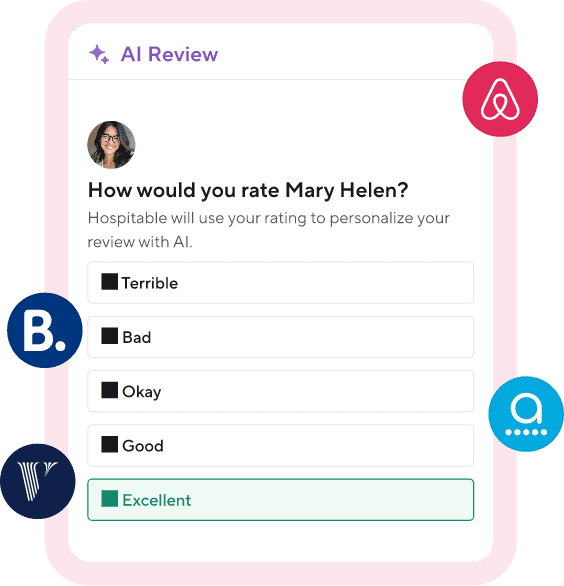
With Hospitable, you can quickly respond to your guests' reviews using AI. When our system receives a new guest review from Airbnb or Booking.com, our AI will draft a relevant response, taking into account the review’s tone and other reservation details. You’ll be able to see the AI-suggested review reply in your Hospitable Inbox and edit it or send it as is.
Hospitable can help you automate the entire review management process, saving you time after every stay. You can either set automated review rules so Hospitable prepares a 5-star review after each stay based on your templates, or use personalized AI-generated review suggestions. Hospitable will also help protect your rating from retaliation when you leave a negative review of your guest.
How to Respond to a Bad Review on Airbnb
It’s never pleasant to receive negative Airbnb reviews, but it's important to remember that not every hosting experience can be perfect, and even top-rated hosts get them from time to time.
The most common guest complaints in negative reviews include cleanliness issues, a confusing check-in process, gaps in communication, listings that didn’t quite match the photos, and amenities that didn't work. So by addressing these common issues, you can provide guests with a great stay.
However, if, despite your best efforts, you get an occasional negative review, never take it as a personal attack; use guest feedback as an opportunity to refine your hosting.
Hospitable’s Copilot makes this easy. Ask it to summarize your recent reviews, and it will pull out the patterns—what guests consistently praise, what keeps coming up as a problem, and what to fix first. A few seconds instead of scrolling through months of feedback.
Here are a few tips for responding to a bad review on Airbnb.
Even if a review feels unfair, resist the urge to argue. Stay calm, professional, and empathetic. Show guests that you’re open to suggestions and take critical feedback seriously.
Begin your response to an Airbnb review by thanking the guest for taking the time to provide their feedback.
Acknowledge the issue they mentioned and apologize for the inconvenience.
Explain what steps you’ve taken to fix the issue. This gives future guests confidence.
If appropriate, invite your guest to try your place again.
For example, when responding to a bad review where a guest complains about uncomfortable beds, you might write:
“Thanks for your review. We really appreciate you taking the time to share your feedback. We’re sorry that you didn’t enjoy your stay since the beds didn’t meet your expectations. Your sleep is important, so we’ve added memory foam toppers to improve comfort for future stays. We hope you will consider staying with us again, and we would love the chance to provide you with a better experience.”
Sometimes you can sense it from the tone in your guests’ messages that they feel frustrated or disappointed. Whatever the reason, there are some steps you can take to reduce the chance of getting a bad review:
Offer a small gift, like a local souvenir, and send a warm checkout message. Such thoughtful gestures can positively influence a guest's overall perception of their stay.
If something major happens during a guest’s stay that hurts their trip, consider offering your guest a full or partial refund.
There is the possibility of your guest forgetting to leave a review. So if you don’t want to encourage them to do so, delay submitting your review for the guest until the last minute when the review period is due to expire.
You may want to check out our blog article for more tips on resolving the conflict when you are about to get a bad review.
Final Thought
Responding to guest reviews on Airbnb is important to maintaining a good reputation as a host. Hopefully, our tips for responding to Airbnb reviews will help you respond like a pro.
In every response, it’s important to express appreciation for the guest’s feedback, acknowledge their experience, and, if necessary, address any issues raised. This way, you’ll make every guest feel heard and valued and show future guests that you care, take responsibility, and are always looking to improve.



Table of contents
Common questions
How do you respond to a negative Airbnb review?
When responding to a negative Airbnb review, stay calm, professional, and empathetic. Thank the guest for their feedback, acknowledge their concerns, apologize when appropriate, and explain what you've done to address the issue. Remember that your response is written as much for future guests as it is for the guest who left the review. Avoid arguing or becoming defensive, even if you believe the review is unfair. A thoughtful response demonstrates that you care about guest satisfaction, take feedback seriously, and are committed to improving the guest experience.
How quickly should you respond to Airbnb reviews?
It's best to respond to Airbnb reviews within three days. A prompt reply shows potential guests that you're attentive, organized, and actively engaged with your hosting business. Whether the review is positive or negative, a timely, personalized response reinforces your commitment to hospitality and helps build trust with future guests who are evaluating your listing.
Can AI help respond to Airbnb reviews?
Yes. AI can draft personalized responses that match the tone of each review while incorporating details from the reservation and guest's stay. This helps hosts respond consistently without spending time writing every reply from scratch. For example, Hospitable automatically generates review replies for Airbnb and Booking.com, allowing hosts to edit the response or publish it as is. The result is a faster review process without sacrificing a personal touch.
How can you identify trends in Airbnb reviews?
Looking at individual reviews is helpful, but the real value comes from identifying recurring patterns. If multiple guests mention the same issue or praise the same feature, you'll know where to focus your efforts to improve future stays. AI can make this process much easier. Hospitable's Copilot can analyze your recent reviews, summarize recurring compliments and complaints, and highlight the operational improvements that will have the biggest impact on guest satisfaction.
Can you automate Airbnb review management?
Yes. Modern property management software can automate much of the review management process, from generating guest reviews to drafting responses when new reviews arrive. With Hospitable, hosts can create automatic review rules, use AI-generated review suggestions, draft personalized public replies, and even reduce the risk of retaliatory reviews when leaving honest feedback about guests. This saves time while helping maintain a consistent, professional review strategy.