OTAs
Airbnb Listing Issues Dashboard: 101 for Hosts
Discover how to use Airbnb's Listing Issues report the smart way, and how to prevent those problems from happening.

Airbnb performance can feel unpredictable. A listing that books steadily can suddenly slow down, even when pricing and seasonality look normal. While there are many factors at play, one theme consistently shows up in strong-performing listings: reliable listing quality.
Airbnb gives hosts a tool that helps translate “quality” from a vague goal into specific, actionable signals. That tool is the Listing Issues page inside Airbnb’s Insights area. It is designed to surface problems that can hurt guest confidence, reduce conversion, and increase the likelihood of customer service involvement.
This post explains what the Listing Issues dashboard is, how to use it as a repeatable workflow, and how Hospitable can help you turn insights into operational improvements that actually stick.
What the Listing Issues dashboard is telling you
The Listing Issues dashboard is best viewed as a quality diagnostic. Airbnb evaluates listing and trip quality using signals that reflect how guests experience the stay, not just how the listing looks. When Airbnb flags an issue, it is usually pointing to friction that can lead to lower ratings, more guest questions, more support contacts, or reduced booking confidence.
Importantly, Listing Issues is not only about “big” problems. The dashboard can also reflect patterns that become expensive over time, such as recurring confusion at check-in, mismatched expectations, or repeated complaints about cleanliness, accuracy, or communication. These are the kinds of issues that often show up in reviews, but by the time they appear publicly, they have already cost you conversion and trust.
A practical mindset is this: Listing Issues helps you find what guests keep experiencing, so you can fix the system that produces it.
How to find Listing Issues in Airbnb
Airbnb has moved more and more host tools into the hosting interface, so make sure you are viewing your account in Hosting mode. From there, navigate to Insights, where you will find performance-related tools. Listing Issues typically lives inside that Insights area.
Airbnb’s layout can vary slightly by account and region, but the core path stays consistent: switch to Hosting, open Insights, then look for issues or quality-related prompts that lead into Listing Issues.
If you manage multiple listings, this view is especially useful because it can reveal recurring patterns across properties that share the same operational process.
A simple workflow for turning Listing Issues into improvements
The biggest mistake hosts make with Listing Issues is treating it like a warning label, glancing at it once, then returning to business as usual. The dashboard becomes powerful when it drives a repeatable improvement cycle.
Here is a practical workflow you can run weekly.
Step 1: Group the issue into a “quality system”
Most quality problems fall into a few systems:
Communication and support
Check-in and access
Cleanliness and turnover execution
Listing accuracy and expectation setting
Availability rules and operational strain
Instead of thinking, “This guest complained,” you want to think, “Which system allowed this complaint to happen?”
That shift matters because system fixes are repeatable. One-off fixes are not.
Step 2: Identify the root cause you can control
Many issues have a visible symptom and a hidden cause.
A check-in complaint might be caused by unclear directions, poor timing of instructions, or an approved exception that was not reflected in the instructions and access codes. A cleanliness complaint might come from an inconsistent cleaner, but it can also come from calendar pressure that forces rushed turns.
Listing Issues gives you the symptom. Your job is to identify the controllable cause.
Step 3: Make one change that prevents recurrence
The goal is not to resolve the complaint for a single reservation. The goal is to reduce the probability of the same complaint happening again.
This is where Hospitable can help most. If your fix lives as a saved message template, a consistent automation, a calendar rule, or a standardized availability setting, it becomes part of your operating system rather than a reminder you might forget.
When issues escalate: suspension and appeals
Quality problems can escalate, especially when multiple guests report similar concerns. Airbnb provides pathways to recover from serious actions when they occur. Hosts can see and respond to these pathways through the same general quality tooling in the host dashboard.
Airbnb also provides options related to reactivation after suspension and appeal processes after removal. The practical takeaway is not to rely on appeals, but to treat early warning signals seriously. A small pattern caught early is much cheaper than a major disruption later.
Turning Listing Issues into action with Hospitable
Airbnb can point to friction. Hospitable helps you remove it, and then keep it removed.
Hospitable’s value in quality improvement comes from turning the guest experience into a consistent workflow across bookings and channels. The most helpful tools for Listing Issues style problems are in three areas: scheduled messaging, question handling, and availability controls.
Below are the most common issue categories and how Hospitable helps fix the root cause.
Communication and responsiveness
Many quality problems are communication problems wearing another disguise. Guests are often less upset about a small issue than about uncertainty, delays, or unclear expectations.
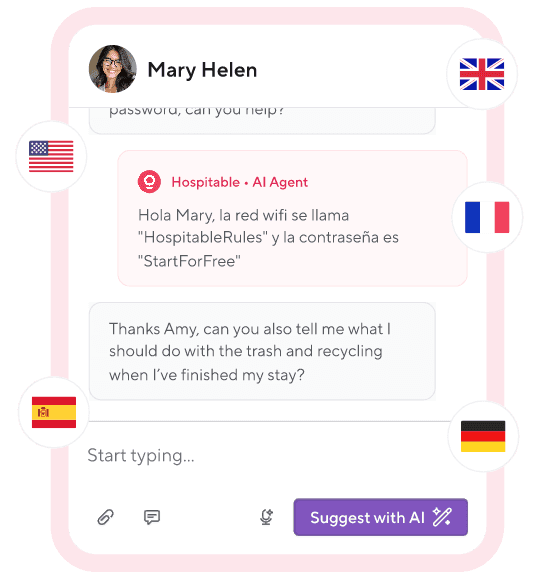
Hospitable’s Guest Experience features are designed to standardize communication across the full stay. In the Hospitable Help Center, “Getting started with Guest Experience” explains how messaging rules automate guest communication from inquiry through post-checkout. When these rules are set up properly, guests receive key information at the right time without you having to send every message manually.
This consistency reduces the conditions that cause negative guest assumptions: “No one is responding,” “I do not know what to do,” or “I am not sure what is expected.”
Repeated guest questions
When guests ask the same questions repeatedly, it usually means information is not being delivered in a way that is easy to find or easy to understand. That friction can manifest as a quality issue and a review comment.
By using Hospitable’s AI Auto Replies for guest messages, AI can respond quickly, maintain a consistent tone, and safely escalate urgent situations. Whether you use full automation or not, faster initial responses reduce the stress that causes small issues to feel large.
Check-in experience
Check-in is one of the highest leverage moments in the stay. When check-in is smooth, guests feel confident. When it is confusing, guests start their stay in a negative emotional state that affects everything that follows.
Hospitable helps you standardize check-in with automated message timing and consistent instructions. It also helps with the most common quality killer: exceptions.
Check out the article “Changing the check-in or checkout time for a particular reservation” to adjust timing on a single booking. This matters because when check-in or checkout changes, your scheduled messages and smart lock timing need to be updated accordingly. If they do not, the guest can be told one thing while the door behaves differently, which leads directly to complaints and support contacts.
Cleanliness quality
A surprising number of cleanliness complaints start as calendar pressure. Back-to-back turns compress the cleaner’s timeline and reduce inspection time. When the schedule is stressful, standards slip.
Preparation time blocks time before and after reservations to create a turnover buffer. Even a small buffer can reduce error rates and allow time for restocking and inspections. This is a quality strategy, not only a scheduling preference.
Operational strain
Some quality problems arise from accepting bookings your operation cannot realistically support. Same-day bookings are a good example. They can be profitable, but if your team cannot execute them reliably, they become a quality risk.
Hospitable availability settings support advance notice, which gives you control over how far in advance a guest must book.
Similarly, some properties need check-in or checkout restrictions to ensure your turnover schedule remains consistent. Centralizing these rules reduces the chance of forgetting a setting change or accidentally creating availability that your team cannot service.
A light weekly routine you can actually sustain
You do not need a complex program. You need a consistent loop.
Once per week, review Listing Issues and identify the most common friction point. Choose one system improvement to implement in Hospitable. That might mean updating an automated message, adding a new question reply, setting preparation time, or tightening an availability rule.
Over time, these small improvements compound. Listing quality becomes more stable, guest confusion decreases, and you spend less time reacting.
Final thought
Airbnb’s Listing Issues view is most useful when it becomes part of your operating rhythm. It is a feedback loop that reveals where the guest experience is breaking down. Hospitable helps you turn that feedback into a durable system by automating communication, reducing repetitive questions, and enforcing availability rules that support your operational reality.